
Edit Box
| Function Syntax | (LM:editbox <str>) |
| Current Version | 1.0 |
| Donate |
| Arguments | ||
|---|---|---|
| Symbol | Type | Description |
| str | String | Initial value to display ("" for none) |
| Returns | ||
| Type | Description | |
| String | Edit box contents if user pressed OK, else nil | |
Function Description
This very simple function utilises a predefined AutoCAD dialog definition to display an interface allowing the user to input a text string.
This approach avoids the need to include an accompanying DCL file with the calling program, or write a temporary dialog definition file to the user's computer.
Select all
;; Edit Box  -  Lee Mac
;; Displays a DCL Edit Box to obtain a string from the user
;; str - [str] Initial value to display ("" for none)
;; Returns: [str] Edit box contents if user pressed OK, else nil

(defun LM:editbox ( str / han )
    (and (< 0 (setq han (load_dialog "acad")))
         (new_dialog  "acad_txtedit" han)
         (set_tile    "text_edit"    str)
         (action_tile "text_edit" "(setq str $value)")
         (if (zerop (start_dialog)) (setq str nil))
    )
    (if (< 0 han) (unload_dialog han))
    str
)
Example Function Call
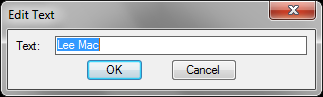
The following function call will display the dialog as shown in the graphic below.
(LM:editbox "Lee Mac")
Example Program
This short program uses the above subfunction to allow the user to edit a selected Text, MText or Attribute object.
Select all
(defun c:qe ( / ent enx str )
    (if (and (setq ent (car (nentsel)))
             (wcmatch  (cdr (assoc 0 (setq enx (entget ent)))) "*TEXT,ATTRIB")
             (setq str (LM:editbox  (cdr (assoc 1 enx))))
             (entmod (subst (cons 1 str) (assoc 1 enx) enx))
        )
        (entupd ent)
    )
    (princ)
)