
Change Block Base Point
| Function Syntax | CBP / CBPR |
| Current Version | 1.5 |
| Download | ChangeBlockBasePointV1-5.lsp |
| View HTML Version | ChangeBlockBasePointV1-5.html |
| Compatible with AutoCAD for Mac? | No |
| Compatible with AutoCAD LT? | Yes |
| Donate | |
| This program is also available at the Autodesk Exchange App Store | |
Program Description
This program allows the user to change the position of the block base point for all references of a block definition in a drawing.
The program offers two commands:
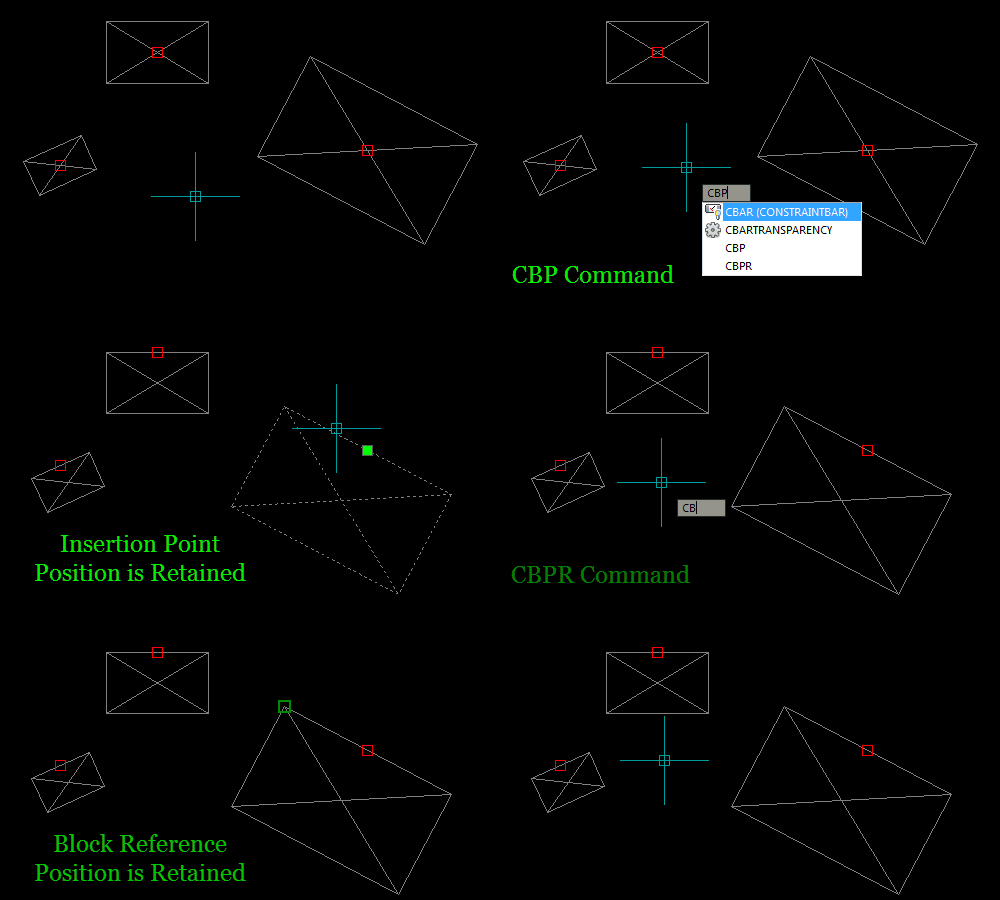
CBP: Change Base Point
This command will retain the insertion point coordinates for all references of the selected block. Hence visually, the block components will be moved around the insertion point when the base point position is changed.
CBPR: Change Base Point retain Reference position
This command will retain the position of each reference of the selected block. That is, the visual position of all block reference geometry will remain unchanged when the position of the block base point is altered.
Upon issuing one of the above commands at the AutoCAD command-line, the program will prompt the user to select a block for which to change the base point position.
Following a valid selection, the user is then prompted to specify a new location for the base point, relative to the selected block reference.
The block definition (and block reference depending on the command used) will then be modified to reflect the new block base point position.
If the selected block is attributed, an ATTSYNC operation will also be performed to ensure all attributes are in the correct positions relative to the new base point.
Finally, the active viewport is regenerated to reflect the changes throughout all references of the block.
The program will furthermore perform successfully with rotated & scaled block references, constructed in any UCS plane.
Please Note: A REGEN is required if the UNDO command is used to undo the operations performed by this program.
Demonstration
Instructions for Running
Please refer to How to Run an AutoLISP Program.